LyX downloads
This directory contains binaries for LyX with the Qt interface on Mac OS X. The difference to the official binaries is that I modified the modifier key bindings.
The binaries on this page are for LyX 1.6.7 and below. Starting with LyX 2.0, this page won't be necessary anymore because the official source now includes my fix for the issue described below.
The LyX sources are available at http://www.lyx.org/Download, and mirrored (e.g.) at http://gd.tuwien.ac.at/publishing/tex/lyx/. The user interface, including the modifier key functionality, is provided by Trolltech's QT libraries. The opensource tarball is found at their FTP site.
In LyX, you can customize the keyboard shortcuts in the user interface, and even customize other interface aspects such as the toolbars (the former page isn't quite up-to-date), but one thing that's hard-wired in LyX versions prior to 2.0 is that the CONTROL and COMMAND (⌘) keys are switched; you have to use the COMMAND key to do things such as emacs' C-k (kill to end of line) etc. The rationale for this is that Apple's conventional modifier key for copy and paste is COMMAND. But for people who also use emacs, this switch is inconvenient.
For my binaries, I have un-done the Apple-specific switch of the COMMAND and CONTROL keys. Use one of these binaries if you want the CONTROL key on the Mac keyboard to correspond to the LyX "C" modifier.
The zip files linked here contain only the app bundle, not the installer. To use these binaries, you therefore should first download and install the official version, then replace LyX.app with mine, making sure the version number matches. Obviously, there is no warranty of any kind for any code downloaded by anyone from my web site, and you are using said code at your own risk.
- Newest versions:
-
Lyx version 1.6.7, compiled with
qt-4.6.2. -
This and the previous version of my binary are experimental. I have used them myself and will note any problems that I observe on this page. Make sure to back up your files often when using these new binaries.
- For Snow Leopard: LyX.zip, Mac OS 10.6.3 (requires Snow Leopard and won't run on Leopard; for OS X 10.5.x, use the builds under item 2.)
- Other OS X versions: Haven't had the opportunity to work on that. For reference, here is the patch I applied to the official
Lyx 1.6.7. You can apply this from the parent directory oflyx-1.6.7by typingpatch -p0 < lyx-167-KeyChoice.patch- Build instructions for intel Core 2 Duo processors:
- Compile
Qt4as described in theINSTALL.MacOSXthat ships with the LyX source. - Next, the instructions in
INSTALL.MacOSXneed to be modified as follows (assumingtcshsyntax - forbash, replacesetenv LDFLAGSbyexport LDFLAGS=):setenv LDFLAGS "-framework Carbon -framework OpenGL -framework AGL -framework QuickTime -framework Cocoa -arch i386" setenv CFLAGS "-arch i386" setenv CXXFLAGS "-arch i386" setenv OBJCFLAGS "-arch i386" ./configure --prefix=/PATH/TO/LyX.app --with-version-suffix=-1.6 --with-qt4-dir=/PATH/TO/qt4 --with-included-gettext --enable-optimization=-Os --host=i386-apple-darwin10 make make install-strip
- Compile
- History:
-
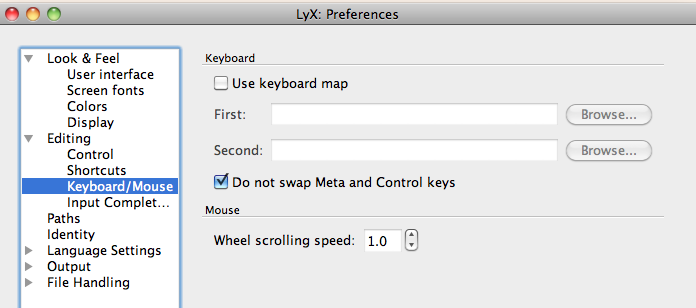 This uses the original Qt distribution without any patches. Instead, I modified LyX as described
in this mailing list thread. The default when you first launch LyX will be the standard (and unnatural) state in which the Apple key plays the role of
This uses the original Qt distribution without any patches. Instead, I modified LyX as described
in this mailing list thread. The default when you first launch LyX will be the standard (and unnatural) state in which the Apple key plays the role of Control. But now you can simply go to thePreferences, underEditing → Keyboard/Mouse, and check the box "Do not swap Meta and Control keys," as shown in the screenshot on the right. The switch of the modifier keys will take effect when you restart LyX. Unlike previous workarounds, this fix also correctly re-labels the keyboard shortcuts as displayed in the menu bar.
However, the new version of Qt causes LyX to ignore mousewheel events (it's not the fault of my LyX patch).- Here is my first version of this modified binary: Lyx version 1.6.6.1, compiled with
qt-4.6.2For Snow Leopard: LyX.zip, Mac OS 10.6.3 (requires Snow Leopard and won't run on Leopard; for OS X 10.5.x, use the build below).
- Here is my first version of this modified binary: Lyx version 1.6.6.1, compiled with
-
Lyx version 1.6.7, compiled with
-
-
Lyx version 1.6.6.1, compiled with patched
qt-4.5.3. -
This is the same version of LyX as above, only compiled against a slightly older version of Qt where the Modifier key switch cannot be done as elegantly. If it turns out that the cutting-edge Qt version in the above binary is causing problems, you may want to revert back to this binary (no difference in functionality).
- Snow Leopard: LyX.zip, OS 10.6.3 (this requires Snow Leopard and won't run on Leopard; for OS X 10.5.x, use the build below).
- Leopard: LyX.zip, OS X 10.5.8
The patch linked here has been applied to the source file
qt-mac-opensource-src-4.5.3/src/gui/kernel/qkeymapper_mac.cpp. - Notes concerning the transition from 1.5.x to 1.6.x
-
I use a modified emacs bind file, and had to make some adjustments after installing LyX 1.6.1:
-
In my custom bind file in the directory
~/Library/Application Support/LyX-1.6/bindI replaced "break-line" by "newline-insert" - the command has changed. -
If
Shift-left-arrowandShift-right-arrowno longer work to select text, go toLyX Preferences > Editing > Shortcutsand search forchar-forward-selectin the list of commands. You will see that the shortcut entry is empty. Just add the key combination Shift + right arrow in that field. Do the same forchar-backward-select.
-
In my custom bind file in the directory
-
Lyx version 1.6.6.1, compiled with patched
- Older versions:
-
Lyx version 1.6.5, compiled with patched
qt-4.5.3on Intel OS 10.5.8 -
lyx.tar.gz. The patch linked here has been applied to the source file
qt-mac-opensource-src-4.5.3/src/gui/kernel/qkeymapper_mac.cpp. The binary also runs on OS X 10.6. -
Lyx version 1.6.2, compiled with patched
qt-4.3.4on Intel OS 10.4, also works on OS 10.5 - LyX.zip
-
Lyx version 1.6.0, compiled with patched
qt-4.3.4on Intel OS 10.4, also works on OS 10.5 - LyX.zip
- Lyx version 1.5.3 for OS X Tiger (10.4), Intel or PowerPC processors:
- Go here
- Lyx version 1.5.3 for OS X Leopard (10.5), Intel processor:
- Go here
- Lyx version 1.4.4 for Mac-Intel, disk image with installer
-
LyXMacIntel1.4.4Keypatch.dmg.gz (10 MB, 02 May 2007)
- Link to PowerPC versions:
- Available from the LyX wiki.
-
Lyx version 1.6.5, compiled with patched
Please let me know if these binaries work for you or not.
I prefer turning off instant preview of math equations in the Preferences. This is my preferred setting because it makes math insets stand out more clearly in the text, and it speeds up the editor.
LyX uses LaTeX to export printable documents (e.g. PDF). However, LyX has meanwhile become so easy to use that you can get impressive results with LyX without knowing much LaTeX. If you want to go beyond the basics and start tweaking LyX output, you will need LaTeX skills; check out my LaTeX Page to learn more.
If you find bugs that the users and developers lists don't know about:
- Search for the issue on Bugzilla
- If the bug isn't found there, file a new report.
noeckel@uoregon.edu Last modified: Tue Sep 21 08:46:45 PDT 2010