LaTeX Info Page
LaTeX: separating content from style, the scientific way
LaTeX is the de facto standard for scientific typesetting; in a nutshell, it's the markup language for maths-oriented print media, in the same way that HTML is the language with which hypertext on the web is formatted. But LaTeX had "style sheets" long before they appeared on the internet as CSS.
LaTeX is capable of essentially everything that you can do in HTML/CSS, including hyperlinks and multimedia, but it can do much more because its foundation, TeX, is actually a kind of programming language, albeit not one that implements the latest fashions. It is from a time when graphical user interfaces (GUIs) were still in their infancy, and most user-interfaces were text or script based. Of course as GUIs matured, they themselves became "scriptable" (see, e.g., ApppleScript on the Mac). The moral of the story is that scripting is still the only way to do serious work on a computer, so why abandon a powerful program like TeX only because it isn't GUI-oriented?
Word processors versus LaTeX
LaTeX allows you to produce high-quality PDF output, and can also be converted to other formats such as RTF, OpenOffice or HTML. But just like HTML, it isn't so easy to see what the output will look like while you're typing the source code. That immediate feedback is something you only get with WYSIWYG editors, i.e., the garden-variety word processor to which MS Word has become eponymous. This is a drawback of LaTeX. The advantage of LaTeX is that the styling of your document can be changed by loading different packages and setting options in a few lines, without having to go back to the content and make changes at the level of paragraphs and equations.
If you want the best of both worlds, you should use LyX. Since this is a page about LaTeX, I will just point you to this introductory video explaining the easy with which LaTeX can be used from within LyX.
As LyX shows, the two worlds of WYSIWYG and LaTeX aren't completely disconnected. One can also, within limits, convert a given document from word processor format to LaTeX format and back. Here are two pages that deal with the conversion problem under various aspects:
The return journey from LaTeX to word processor format is, however, a more advanced topic, because it involves the tex4ht package - a highly customizable but also highly intricate system for translating both the semantic and stylistic content of a LaTeX document into HTML and related markup languages (Here is an example for the uses of tex4ht.). These conversion problems become much easier to solve if you write your documents in LyX right from the start. The reason is that the internal format used by LyX is much closer than LaTeX to the XML structure underlying web pages and Office documents.
Where to get LaTeX
- The main source: MacTeX homepage
- More links and information: TeX on Mac OS X Wiki
- The
texlivedistribution (which is the bulk of MacTeX) is also available from fink If you previously installed fink'stetexpackage, you can replace it withtexliveby following the instructions here.
Fancy formatting with LaTeX
Your computer comes with many fonts installed. In a word processor, you are usually limited to a certain set of font sizes, and of course the text flows along horizontal lines. In LaTeX, this is similar for basic usage, but with only a few customizations it's possible to go much further. There is, e.g., thescalefnt package, and the rotating package. With these you can create text that is either huge or microscopically small, and criscrosses the page at any desired angle. Scaling to arbitrary sizes doesn't work with all maths fonts (the age of TeX shows here), but it does work, e.g., with mathtime or mathpazo.
But how can I switch from Word to LaTeX?
That can be very easy if you don't have complicated formatting going on, and if you aren't using math formulas, cross references and other fancy things. OK, so in other words, for the audience I'm talking to here, it is not easy.
So don't even start with Word for serious work. It's hard to keep it future-proof and portable (unless you're able to spend the money on upgrades and site-licensing etc.)
For people who want to go through with the switch, I'll try to give some advice on a separate page.
Learning LaTeX
There is an inexhaustible amount of information on LaTeX on the web -
- Try out LaTeX on the web right now:
-
An online tool that lets you experiment with LaTeX both from a command line and using symbol palettes. Very useful for making
pngimages of equations, if you don't have LaTeX on your computer. - Texify
- TeXeR (by Art of roblem Solving)
-
An online tool that lets you experiment with LaTeX both from a command line and using symbol palettes. Very useful for making
- Sometimes it's hard to find the LaTeX code for a symbol. If you know how to draw that symbol, chances are you'll find the command you're looking for on the Detexify2 site:
- The LaTeX wikibook
- An old but useful primer
- A good starting point is the intro page at Cambridge.
- The UK TeX FAQ has many answers to common questions.
- The official start page with lots of links is the TeX User Group (TUG)
- In particular, a comprehensive index of available packages is available from the TUG Topical Catalog
- Particularly for Mac users, there is some additional information available from the MacTeX Working Group page.
- A very useful practical guide for people coming to LaTeX with a background in conventional word processors is this PDF document. It explains how to transscribe typical text processor actions into LaTeX commands. I think that's a great way of organizing a LaTeX introduction for a general audience, even though it goes somewhat against the philosophy of a LaTeX purist.
- There is also an old page with samples for students here at the University of Oregon Physics Department.
-
If you want to write a UO thesis in LaTeX, try the
uothesisLaTeX package on CTAN. - You do not need Adobe Acrobat to make fancy PDF files. A lot can be done using pdflatex and some extra packages. For example, one can fully embed movies in PDF files.
- More links can be found at the LaTeX project site
Useful LaTeX/PDF tools
This is a random and incomplete list!- To work with bibliographies, use BibDesk
-
LaTeX conventionally produces output in
dviformat. The following programs can opendvifiles:- TeXShop or iTeXMac, see here for details.
- TeXniscope
-
xdvi(k), the original Xwindow program. It is the only one (in this list) that does not need to build an auxiliary PDF file from the dvi input first.
-
You can find LaTeX related documentation from the command line using
texdoc; for example, to get general information about the latex command itself, typetexdoc latex. - For LaTeX compilers and typesetting interfaces for Mac OS X, see the page on scientific presentations.
- In addition to the above, a very complete LaTeX editing environment with lots of toolbars and exhaustive graphical menus for Math symbols is Texmaker. It also includes a rather straightforward LaTeX-to-HTML converter, but has to invoke external previewers (e.g., Adobe Reader) to display LaTeX output. This is a free cross-platform product.
- If you're learning LaTeX, graphical lists of Math symbols are a good way of familiarizing yourself with the available commands. The Texmaker application above is very useful from this point of view. A much more modest application is TeXFoG, a graphical menu interface providing a LaTeX command "dictionary". It is not a LaTeX editor environment but allows you to copy the commands you looked up into other documents.
- pdfcrop, a command-line script that can remove or adjust the margins of a PDF document; useful, e.g., for graphics files that you want to include in your LaTeX document.
- To combine PDF documents (say, file1.pdf and file2.pdf) into a single one (combined.pdf), there are several methods:
-
texexec --pdfarrange --result=merged.pdf file1.pdf file22.pdf
Thetexexecutility can also be used to extract pages from a file, and much more (see the manual page). -
From the command line, there is also the option to use ghostscript.
Using ghostscript, extracting and combining pages is a bit more involved but benefits from greater flexibility. For example:
Start with a multi-page file "newfile1.pdf" in an otherwise empty working directory. I'm assuming I want the page numbers 2, 4 and 5 extracted. The code for this could look like this (in
tcsh):foreach i ( 2 4 5) foreach? gs -dSAFER -dBATCH -dNOPAUSE -dFirstPage=$i -dLastPage=$i -sDEVICE=pdfwrite -sOutputFile=im$i.pdf newfile1.pdf foreach? end gs -dSAFER -dBATCH -dNOPAUSE -sDEVICE=pdfwrite -sOutputFile=combine.pdf `ls -t im*.pdf`
With this, the output file "combine.pdf" has the desired three pages and also the original page format. You have to usetcshso that the "foreach" command is recognized, which I use to loop through the list of pages to be extracted. The loop creates one file each per extracted page, and the last line after the loop combines these pages back into a single document. Thels -tabove sorts the individual pages in the order in which they were created. - There are other, more Mac-specific, methods for combining PDF files. With
Automator, it's easy to create a workflow containing the steps "Combine PDF Pages", followed by "Open Images in Preview". Saved this as aFinder Pluginto be accessed by right-clicking any set of PDFs in a Finder window. In Mac OS Leopard, the Preview application provides this functionality. - The above
Automatorscript on Mac OS X opens up another command-line solution to combinePDFfiles. Essentially, Automator uses Apple's built-in CoreGraphics library via aPythonscript. That script can also be called by the user directly, as I did for example in this post on the Mathematica user group. The syntax for mergingfile1.pdfandfile2.pdfwould be/System/Library/Automator/Combine\ PDF\ Pages.action/Contents/Resources/join.py --output merged.pdf file1.pdf file2.pdf
-
-
The above page combination and extraction jobs can also be accomplished using
pdflatexand thepdfpagespackage. Instead of doing the same thing again, here is another example for the use ofpdfpages:
Imagine you want to change the background color of a PDF document. A procedure to accomplish this can be based on the followingLaTeXcode:\documentclass{minimal} \usepackage{xcolor} \pagecolor[HTML]{B0A030}\usepackage{pdfpages} \begin{document} \includepdf[fitpaper,pages=-]{inputfile.pdf} \end{document}Here, the desired background color is given in hexadecimals, e.g.,B0A030(as one does in HTML code, too). The screenshot below shows what this looks like:
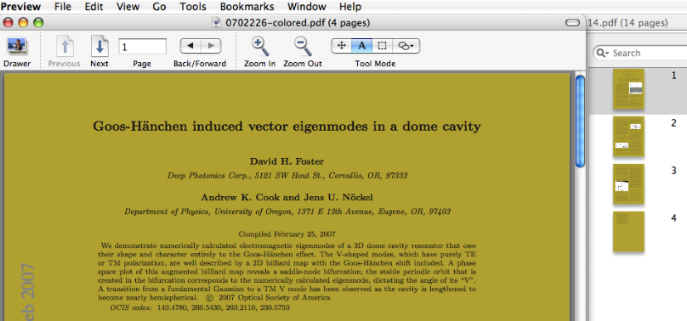
I originally came up with this idea in response to a question on the Mac OS X TeX mailing list, regarding LaTeXiT formulas embedded in Keynote. The script linked here works for single- or multi-page PDF files. The background color should fill all of the pages completely, although there may be un-colored borders in some cases. As you can see on the right of the screenshot, the background doesn't show behind embedded graphics that have their own (white, e.g.) background.Incidentally, the script removes access restrictions from the PDF file while recompiling it (it's not my script that does that, it's the pdfpages package). Obviously, you should use it on such files only with the proper permission.
Based on
pdfpages, I wrote a script that can not only color the background of a PDF file, but also re-arrange its pages so that there are n×m original pages per physical output page. This is also called "n-up" printing. Details about the script are on a separate page.
noeckel@uoregon.edu Last modified: Sat Nov 12 18:41:49 PST 2011